
Deploy Mendix on a Local Floci Kubernetes Lab
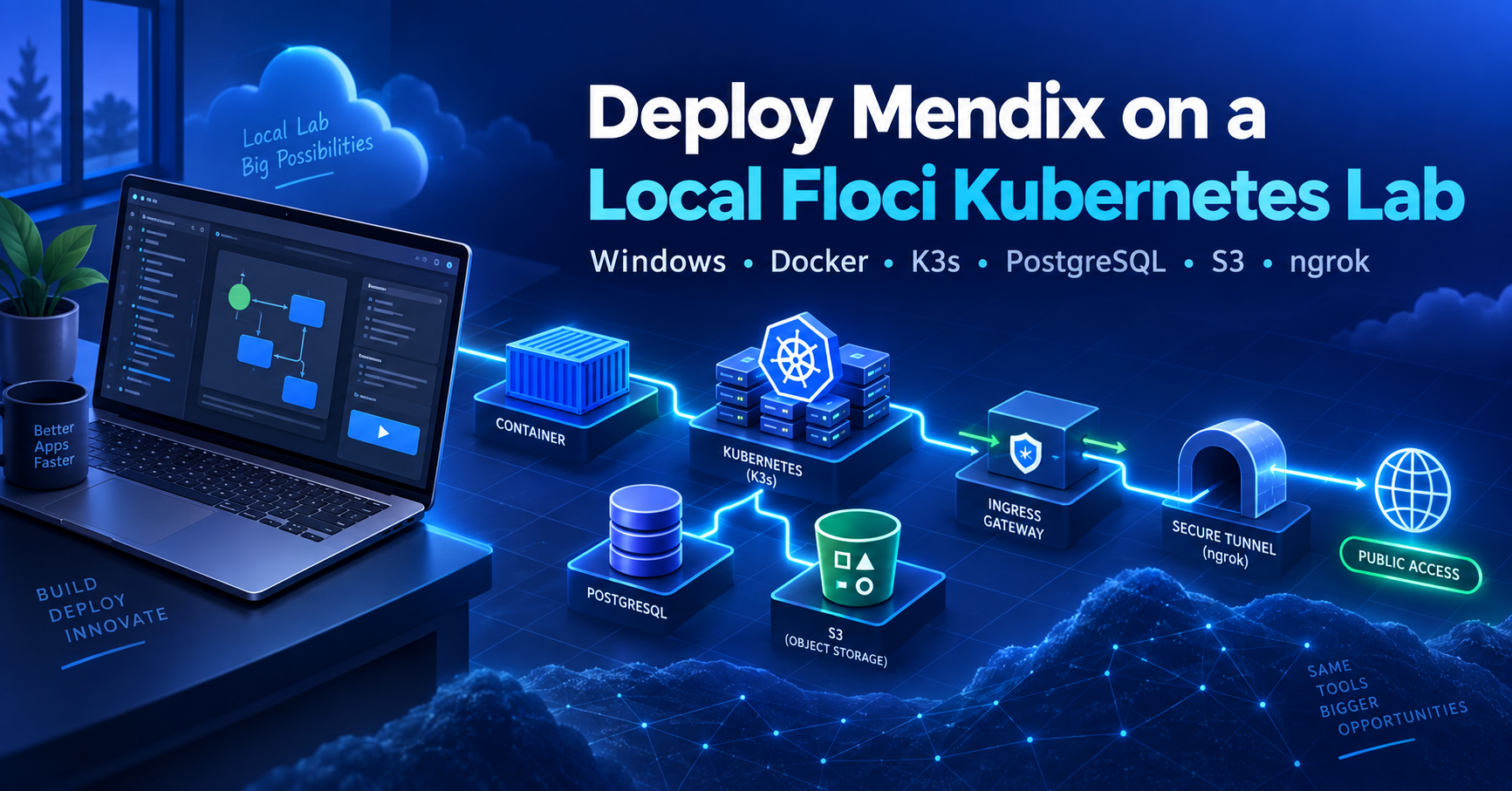
A verified Windows guide for Floci K3s PostgreSQL S3 ingress nginx GitHub Container Registry and ngrok
| Guide detail | Value |
|---|---|
| Prepared for | Sukhvinder Singh |
| Verified on | 13 September 2026 |
| Host | Windows 11 with Docker Desktop and WSL2 |
| Outcome | Mendix 11.13.0 runtime accessible through a stable public ngrok URL |
| Recovery | One PowerShell script restores the lab after Windows sign in |
This guide rebuilds the lab from an empty Floci environment to a running Mendix application. It incorporates the corrections verified during the deployment: fixed Docker addresses, Kubernetes EndpointSlices, GitHub Container Registry authentication, a free ngrok Cloud Endpoint, and a restart automation that returned exit code 0.
Scope: This is a learning and demonstration environment. Floci emulates AWS services locally; it does not reproduce production AWS security, resilience, backups, networking, or service-level guarantees.
Successful final state
| Component | Verified state |
|---|---|
| Floci | Healthy at 172.20.0.6:4566 with persistent storage |
| Kubernetes | Floci EKS-compatible K3s node Ready; context floci-mendix |
| PostgreSQL | Floci RDS container at 172.20.0.3:5432 |
| S3 | Bucket mendix-floci-files through floci-s3 service |
| Ingress | ingress-nginx; NodePorts 30080 and 30443 |
| Registry | Private GHCR repository with Kubernetes pull secret |
| Mendix app | Build and runtime green; 1 of 1 replicas running |
| Public URL | https://completable-noncommemorational-terica.ngrok-free.dev/ |
| Restart task | Start Floci Mendix Lab; LastTaskResult 0 |
Contents
1. Architecture and fixed addressing
2. Prerequisites and security rules
3. Create the persistent Floci foundation
4. Create and connect the K3s cluster
5. Configure PostgreSQL and S3
6. Register the namespace and install the Mendix components
7. Install ingress nginx and connect ngrok
8. Configure database storage ingress and registry plans
9. Create a package and a development environment
10. Fix the free ngrok hostname
11. Troubleshoot GHCR image pulls
12. Restore the lab automatically after restart
13. Final validation and operating notes
Architecture and fixed addressing
The public ngrok Cloud Endpoint forwards traffic to the local ngrok agent at default.internal. The agent sends traffic to localhost port 8080, where kubectl forwards it to ingress-nginx. Kubernetes routes the request to the Mendix runtime. The runtime reaches PostgreSQL and S3 through stable Kubernetes services backed by external EndpointSlices.
Internet HTTPS
-> ngrok Cloud Endpoint
-> ngrok agent default.internal
-> localhost:8080
-> ingress-nginx service port 80
-> Mendix Ingress and runtime
-> floci-rds:5432 and floci-s3:4566
| Address | Purpose |
|---|---|
| 172.20.0.1 | floci_default network gateway |
| 172.20.0.3 | Floci PostgreSQL container |
| 172.20.0.4 | Floci K3s cluster container |
| 172.20.0.6 | Floci API and S3 emulator |
| localhost:6500 | K3s Kubernetes API endpoint |
| localhost:8080 | Local ingress port-forward |
| localhost:4566 | Floci API from Windows |
Prerequisites and security rules
Docker Desktop with WSL2 enabled.
AWS CLI, kubectl, Helm 3, mxpc-cli, and ngrok v3 available on Windows.
A GitHub account and a private GHCR package path.
A reserved ngrok free domain and an authenticated ngrok agent.
Do not publish Namespace Secrets, GitHub tokens, ngrok authtokens, database passwords, subscription secrets, signed package URLs, or generated YAML containing credentials.
Never run docker system prune --volumes or docker volume prune against this lab.
Create the persistent Floci foundation
Create the external Docker network
The Compose file uses an external network. A first-time reader must create it before running docker compose.
docker network create `
--driver bridge `
--subnet 172.20.0.0/16 `
--gateway 172.20.0.1 `
floci_default
Verify the network configuration:
docker network inspect floci_default
Create persistent storage
New-Item -ItemType Directory -Force -Path "D:\Floci\data"
Create the Compose file
Save this as D:\Developer-Knowledge-Hub\01-Inbox\Floci\compose.yml. The fixed address prevents the S3 endpoint from changing after a restart.
services:
floci:
image: floci/floci:latest
ports:
"4566:4566"
environment:
FLOCI_STORAGE_MODE: persistent
FLOCI_STORAGE_PERSISTENT_PATH: /app/data
volumes:D:/Floci/data:/app/data
/var/run/docker.sock:/var/run/docker.sock
networks:
default:
ipv4_address: 172.20.0.6networks:
default:
external: true
name: floci_defaultdocker compose -f "D:\Developer-Knowledge-Hub\01-Inbox\Floci\compose.yml" up -d
docker inspect floci-floci-1 --format "Status={{.State.Status}} Health={{.State.Health.Status}}"
Expected result: Status=running and Health=healthy.
Verify Floci services
Invoke-RestMethod "http://localhost:4566/\_localstack/health" | ConvertTo-Json -Depth 10
Create and connect the K3s cluster
Create the emulated IAM role
$trustPolicy = '{"Version":"2012-10-17","Statement":[{"Effect":"Allow","Principal":{"Service":"eks.amazonaws.com"},"Action":"sts:AssumeRole"}]}'
aws iam create-role `
--role-name FlociEksClusterRole `
--assume-role-policy-document $trustPolicy `
--endpoint-url http://localhost:4566 `
--region us-east-1 `
--no-cli-pager
Create the EKS-compatible cluster
aws eks create-cluster `
--name mendix-floci-cluster `
--role-arn arn:aws:iam::000000000000:role/FlociEksClusterRole `
--resources-vpc-config "subnetIds=subnet-default-a,subnet-default-b,subnet-default-c,securityGroupIds=sg-default,endpointPublicAccess=true,endpointPrivateAccess=false" `
--endpoint-url http://localhost:4566 `
--region us-east-1 `
--no-cli-pageraws eks describe-cluster `
--name mendix-floci-cluster `
--endpoint-url http://localhost:4566 `
--region us-east-1 `
--query "cluster.{Status:status,Endpoint:endpoint}" `
--no-cli-pager
Continue when the status is ACTIVE and the endpoint is https://localhost:6500.
Attach the K3s container to the fixed network
docker network connect `
--ip 172.20.0.4 `
floci_default `
floci-eks-mendix-floci-cluster
If Docker reports that the endpoint already exists, inspect the existing address instead of reconnecting it.
Create the kubeconfig context
aws eks update-kubeconfig `
--name mendix-floci-cluster `
--alias floci-mendix `
--endpoint-url http://localhost:4566 `
--region us-east-1kubectl config use-context floci-mendix
kubectl get nodes -o wide
kubectl get storageclass
Expected result: one K3s control-plane node is Ready and local-path is the default StorageClass.
Configure PostgreSQL and S3
Create PostgreSQL
aws rds create-db-subnet-group `
--db-subnet-group-name mendix-rds-subnet-group `
--db-subnet-group-description "Subnet group for Mendix PostgreSQL" `
--subnet-ids subnet-default-a subnet-default-b subnet-default-c `
--endpoint-url http://localhost:4566 `
--region us-east-1 `
--no-cli-pager
Prompt securely for the database password so it is not stored in PowerShell history:
$dbSecurePassword = Read-Host "Enter the PostgreSQL password" -AsSecureString
$dbPassword = [Runtime.InteropServices.Marshal]::PtrToStringAuto(
[Runtime.InteropServices.Marshal]::SecureStringToBSTR($dbSecurePassword)
)aws rds create-db-instance `
--db-instance-identifier mendix-postgres `
--db-instance-class db.t3.micro `
--engine postgres `
--allocated-storage 20 `
--master-username mendixadmin `
--master-user-password $dbPassword `
--db-name mendixdb `
--db-subnet-group-name mendix-rds-subnet-group `
--vpc-security-group-ids sg-default `
--no-publicly-accessible `
--endpoint-url http://localhost:4566 `
--region us-east-1 `
--no-cli-pager\(dbPassword = \)null
\(dbSecurePassword = \)null
Important: Floci API metadata may advertise 172.20.0.6:7001, but Kubernetes must connect to the actual PostgreSQL container on port 5432. Inspect the generated container and attach it to the fixed network.
$RdsContainer = docker ps -a --format "{{.Names}}" |
Where-Object { $_ -like "floci-rds-*" } |
Select-Object -First 1docker network connect --ip 172.20.0.3 floci_default $RdsContainer
Create the PostgreSQL Kubernetes service
kubectl create namespace mendix-floci
kubectl create service clusterip floci-rds --tcp=5432:5432 -n mendix-floci
kubectl patch service floci-rds -n mendix-floci --type=merge --patch '{\spec\:{\selector\:null}}'@"
apiVersion: discovery.k8s.io/v1
kind: EndpointSlice
metadata:
name: floci-rds-external
namespace: mendix-floci
labels:
kubernetes.io/service-name: floci-rds
addressType: IPv4
ports:
name: 5432-5432
protocol: TCP
port: 5432
endpoints:addresses: ["172.20.0.3"]
conditions:
ready: true
"@ | kubectl apply -f -
The EndpointSlice port name must exactly match the generated Service port name 5432-5432. A different name can cause the Service DNS test to fail even when the direct IP succeeds.
kubectl run rds-service-test -n mendix-floci `
--image=busybox:1.36 --restart=Never --rm -i `
--command -- nc -zvw5 floci-rds.mendix-floci.svc.cluster.local 5432
Create S3 storage
aws s3api create-bucket `
--bucket mendix-floci-files `
--endpoint-url http://localhost:4566 `
--region us-east-1 `
--no-cli-pagerkubectl create service clusterip floci-s3 --tcp=4566:4566 -n mendix-floci
kubectl patch service floci-s3 -n mendix-floci --type=merge --patch '{\spec\:{\selector\:null}}'@"
apiVersion: discovery.k8s.io/v1
kind: EndpointSlice
metadata:
name: floci-s3-external
namespace: mendix-floci
labels:
kubernetes.io/service-name: floci-s3
addressType: IPv4
ports:
name: 4566-4566
protocol: TCP
port: 4566
endpoints:addresses: ["172.20.0.6"]
conditions:
ready: true
"@ | kubectl apply -f -
Register the namespace and install Mendix
Keep the existing Portal cluster registration if it represents this lab. Create or reuse the Kubernetes namespace mendix-floci, then add that namespace in Mendix on Kubernetes Cluster Manager. Use the cluster type Kubernetes because the actual node is K3s.
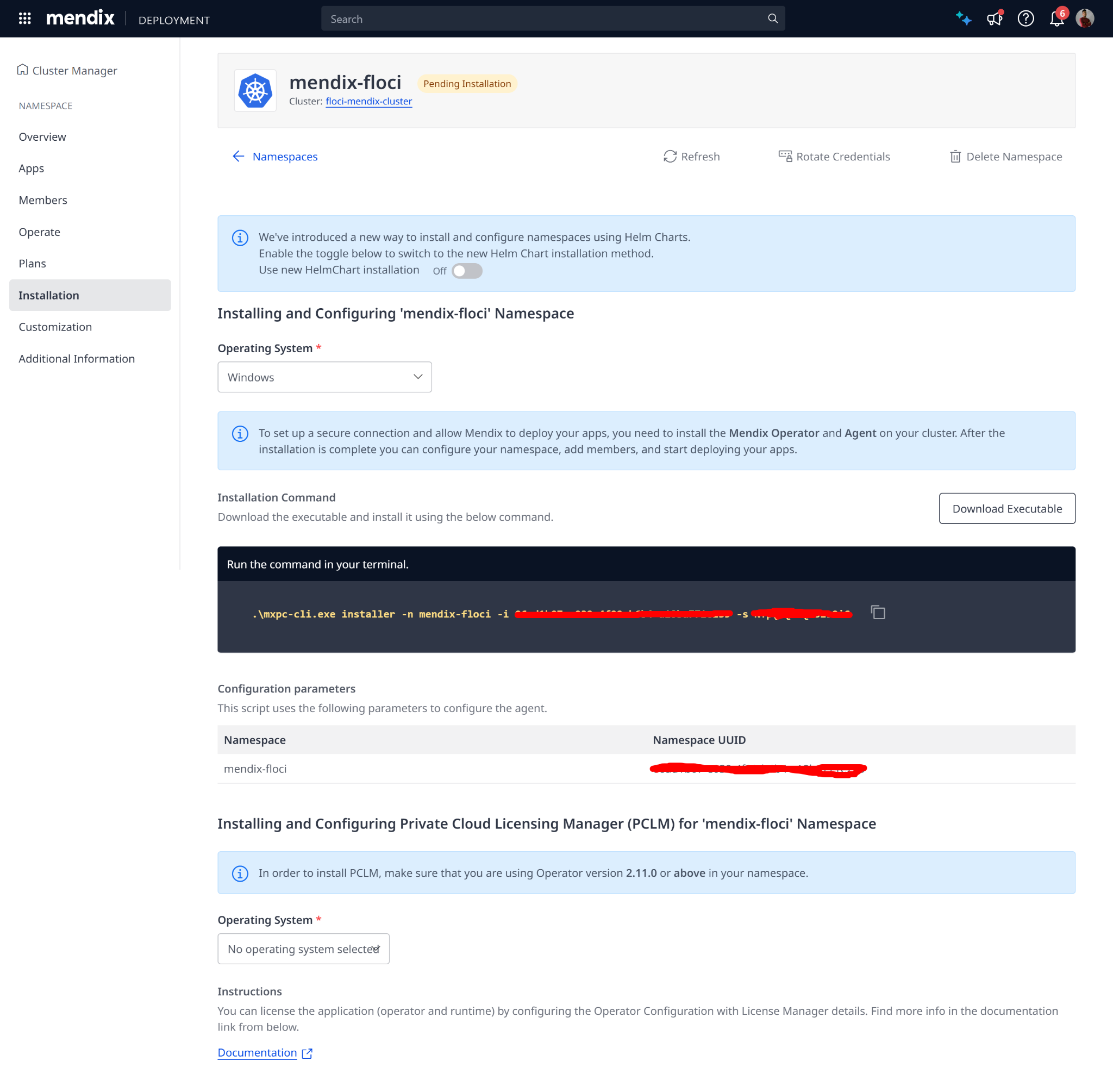

Mendix namespace installation page. Namespace identifiers and secrets must remain redacted.
Run the namespace installer
.\mxpc-cli.exe installer -n mendix-floci -i <NAMESPACE_ID> -s <NAMESPACE_SECRET>
In the installer, complete Base Installation. Verify that the Agent and Operator become healthy.
kubectl get pods -n mendix-floci -o wide
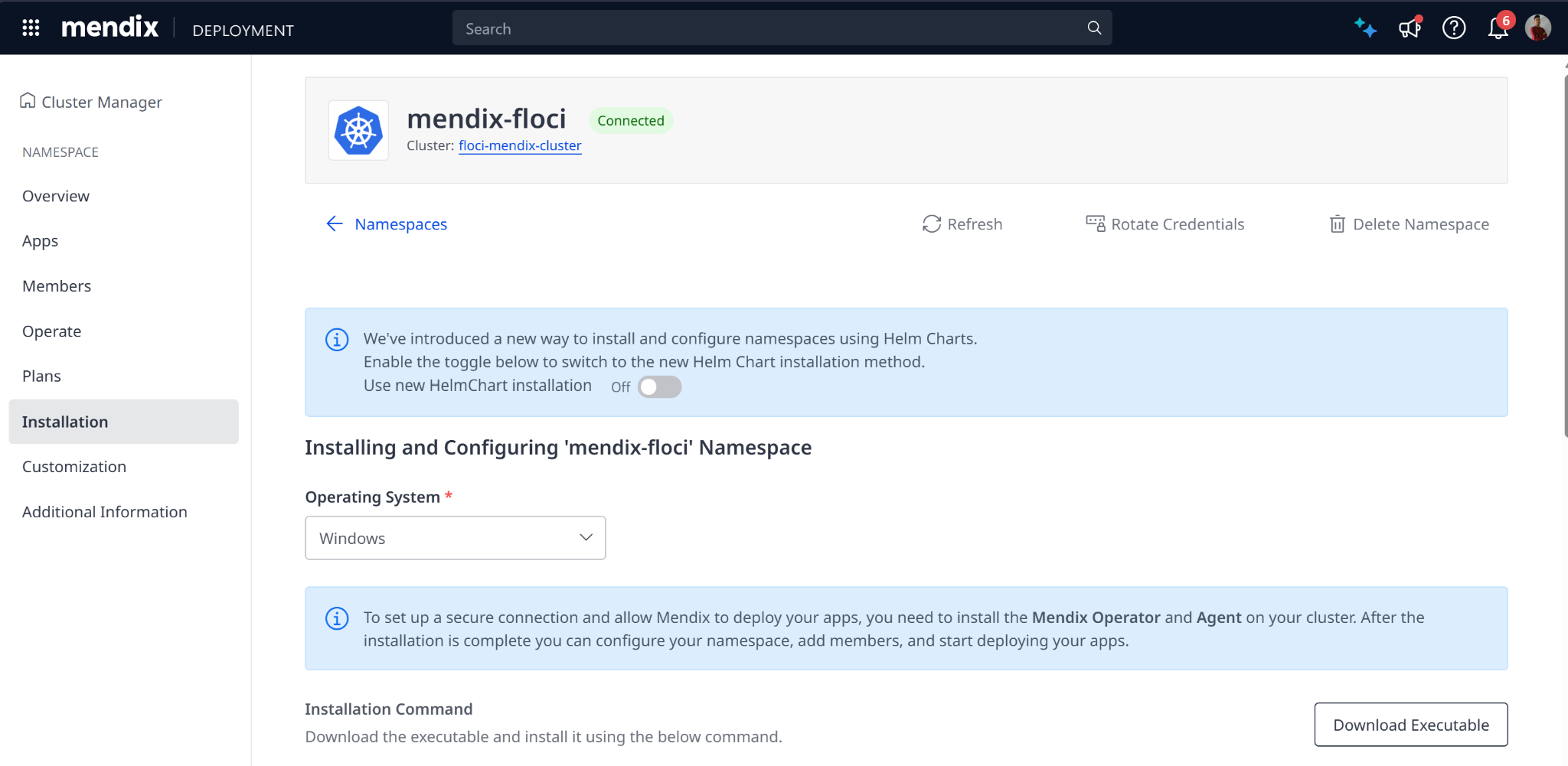

The namespace is connected after the Mendix Agent and Operator are running.
Install ingress nginx and connect ngrok
Install ingress nginx
helm repo add ingress-nginx https://kubernetes.github.io/ingress-nginx
helm repo updatehelm install ingress-nginx ingress-nginx/ingress-nginx `
--namespace ingress-nginx `
--create-namespace `
--set controller.service.type=NodePort `
--set controller.service.nodePorts.http=30080 `
--set controller.service.nodePorts.https=30443 `
--set controller.ingressClassResource.default=truekubectl get pods -n ingress-nginx -o wide
kubectl get ingressclass
Expected result: ingress-nginx-controller is 1/1 Running and the nginx IngressClass exists.
Reserve and connect the ngrok domain
Reserve the free domain completable-noncommemorational-terica.ngrok-free.dev in ngrok. Configure the Cloud Endpoint to forward to https://default.internal. The public ngrok endpoint terminates TLS; Kubernetes ingress TLS remains disabled in this lab.
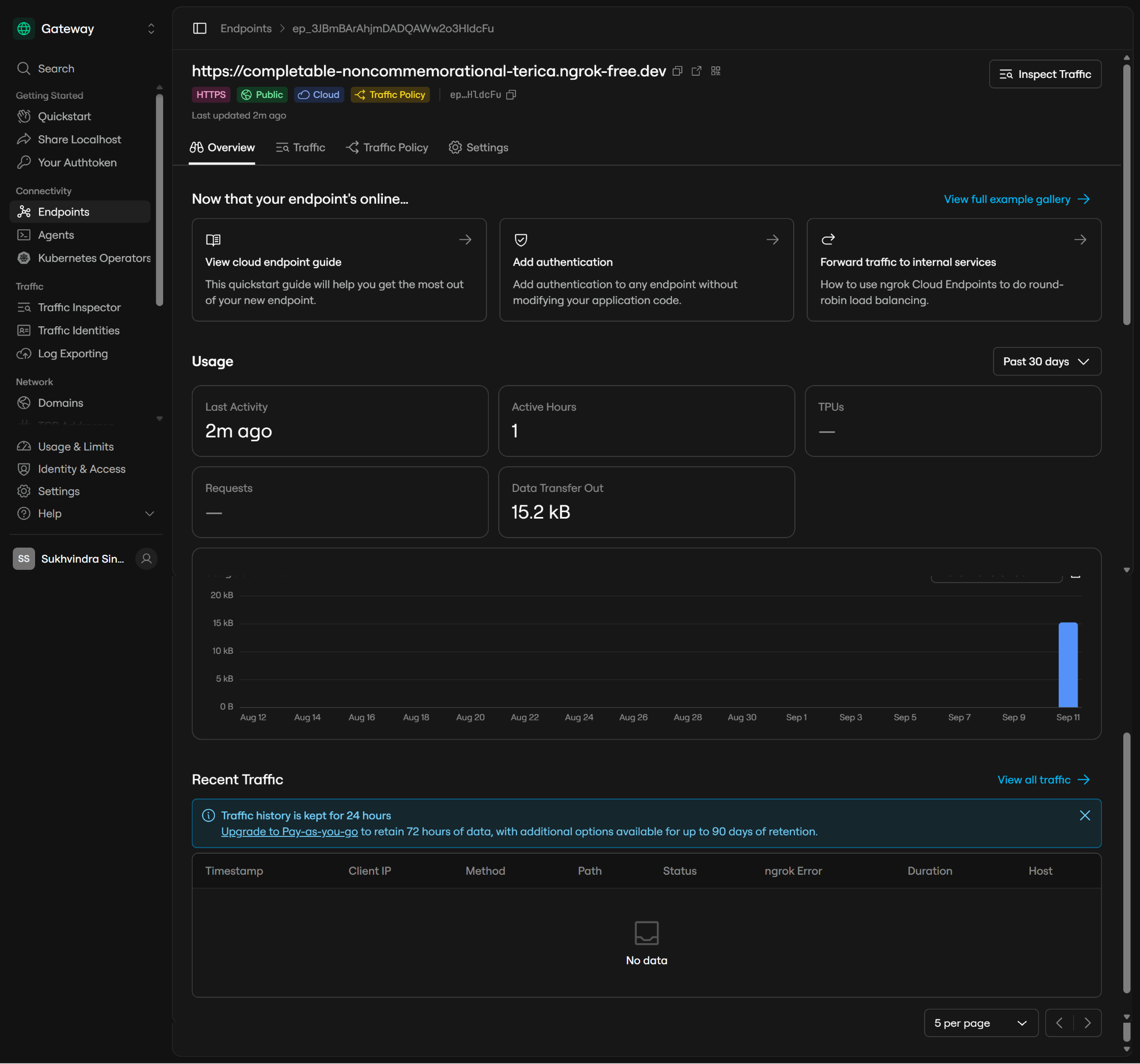

Reserved ngrok public Cloud Endpoint.
Start a local port-forward and keep the process running:
kubectl port-forward -n ingress-nginx service/ingress-nginx-controller 8080:80
In a second PowerShell window, start the ngrok agent from its installation directory:
.\ngrok.exe http 8080 --url https://default.internal
If ERR_NGROK_334 appears, an older ngrok process already owns the endpoint. Inspect and stop only that stale process, then run the correct command again.
Get-CimInstance Win32_Process |
Where-Object { $_.Name -eq "ngrok.exe" } |
Select-Object ProcessId, CommandLine
Configure Mendix plans and registry
Database plan
| Field | Value |
|---|---|
| Name | floci-rds-postgres |
| Host | floci-rds.mendix-floci.svc.cluster.local |
| Port | 5432 |
| Strict TLS | Off for the local emulator |
| Database Name | postgres |
| Authentication | static |
| Username | mendixadmin |
| Password | The securely created RDS administrator password |

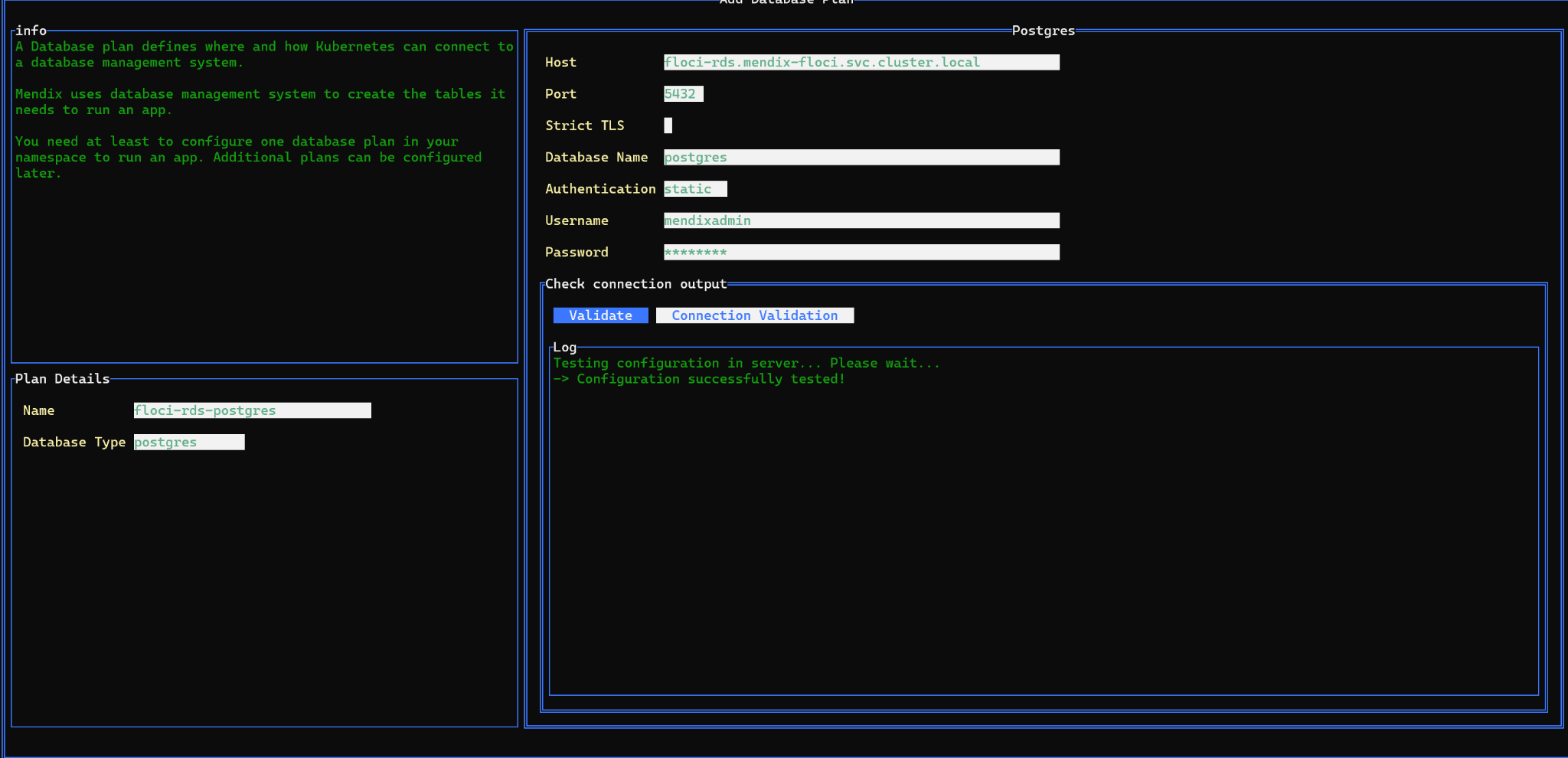
The PostgreSQL database plan validates successfully with the configured master username.
S3 storage plan
| Field | Value |
|---|---|
| Name | floci-s3-storage |
| Type | amazon-s3 |
| Endpoint | http://floci-s3.mendix-floci.svc.cluster.local:4566 |
| Bucket Prefix | mendix-floci-files |
| IRSA | Off |
| Share bucket | Off |
| Credentials | Local emulator credentials only; mask them in screenshots |

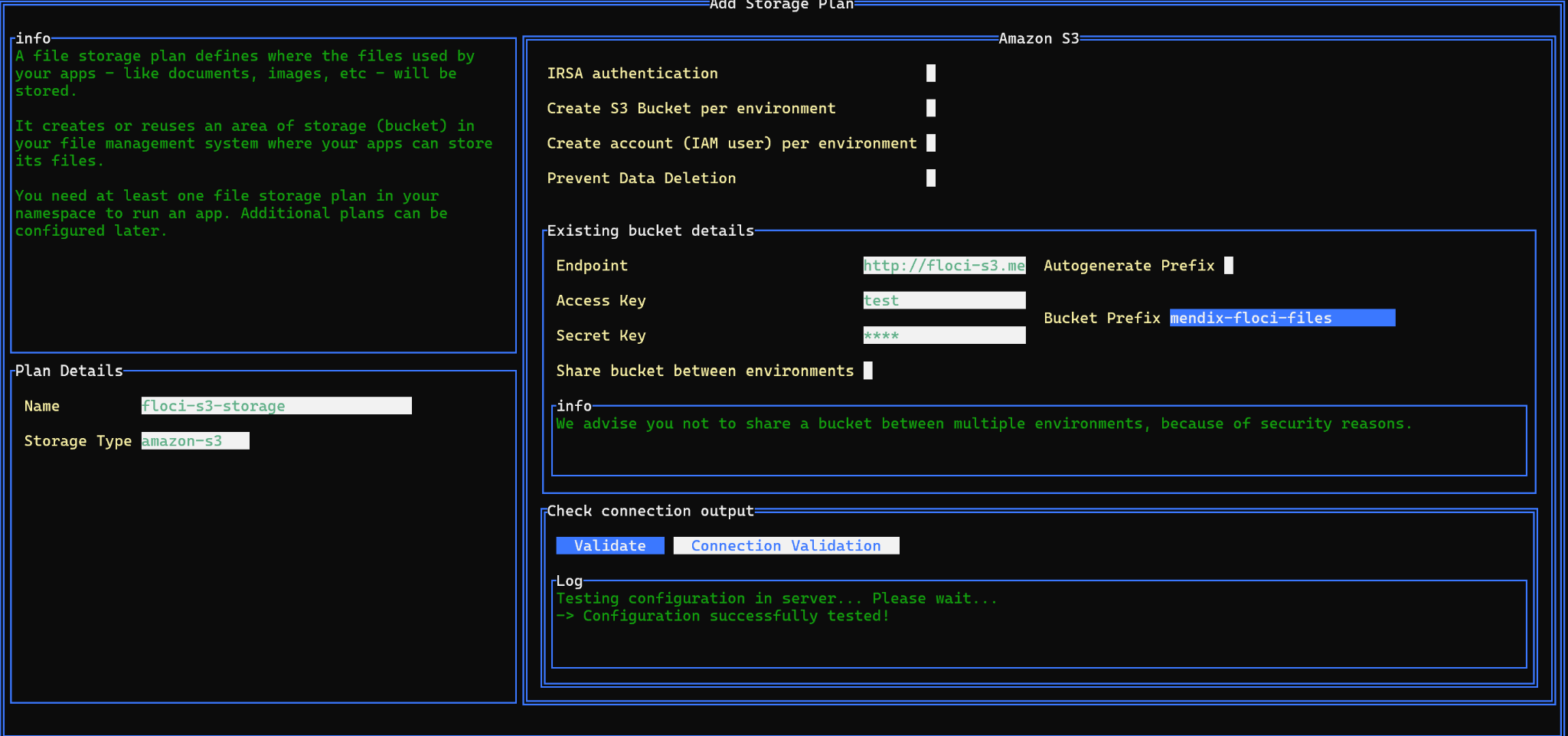
The Floci S3 storage plan validates through the Kubernetes service.
Ingress configuration
| Field | Value |
|---|---|
| Ingress Type | kubernetes-ingress |
| Domain Name | completable-noncommemorational-terica.ngrok-free.dev |
| Path | / |
| Enable TLS | Off; ngrok provides public HTTPS |
| Custom Ingress Class | On |
| Ingress Class Name | nginx |
| Set class as annotation | Off |

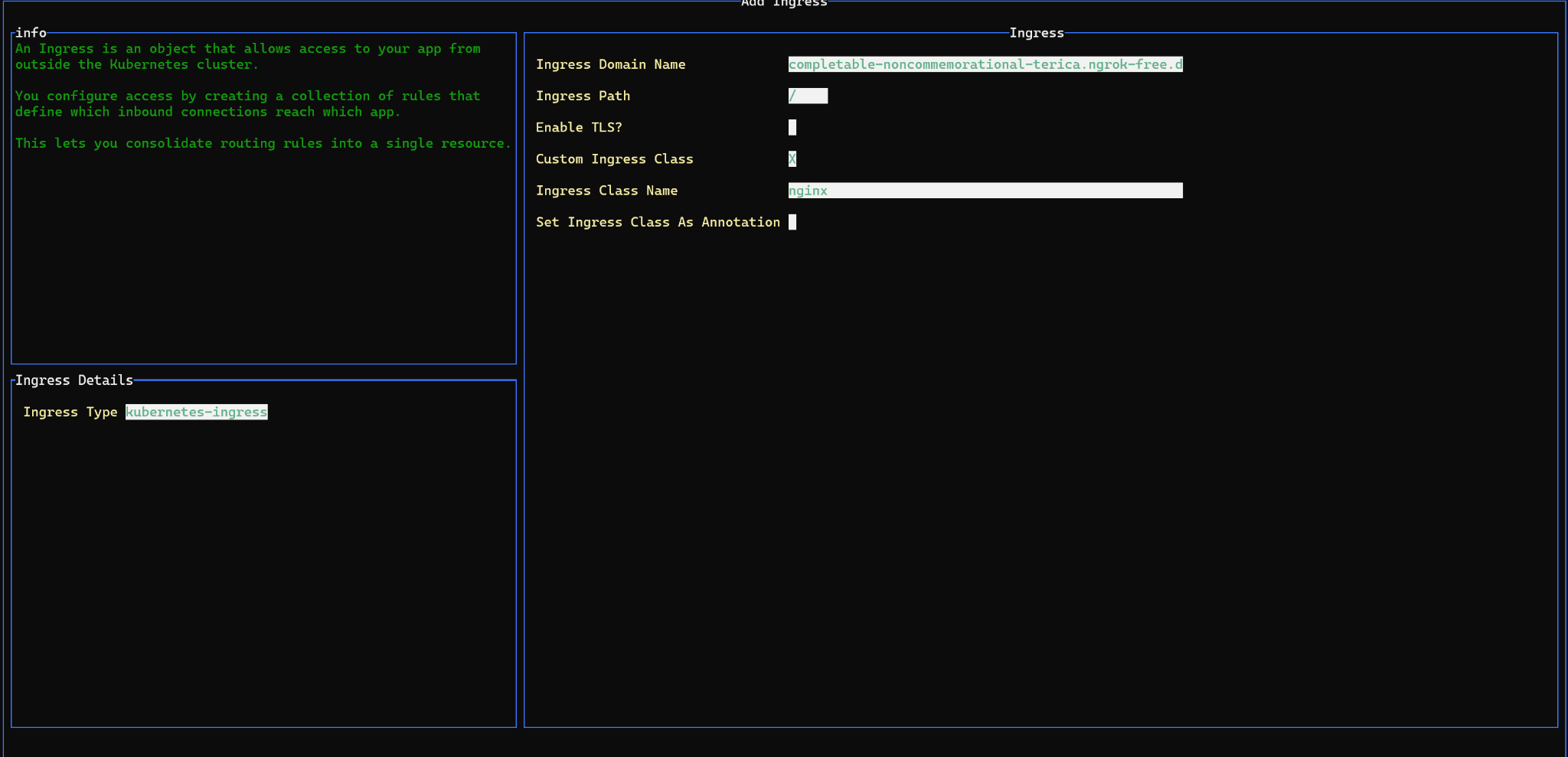
Ingress uses the reserved ngrok hostname and nginx class.
GitHub Container Registry
Create a GitHub personal access token with read:packages and write:packages. Never put the token directly in a published command or screenshot.
| Field | Value |
|---|---|
| Registry Type | generic |
| Pull URL | ghcr.io |
| Push URL | ghcr.io |
| Registry Name | sukhvindra-singh/mendix-resources |
| Authentication | On |
| User | sukhvindra-singh |
| Password | GitHub token; masked |
| Default service account | Add credentials to pull secrets |
Use only owner/repository in Registry Name. Do not enter a tag template in that field; Mendix creates the environment-specific tag.

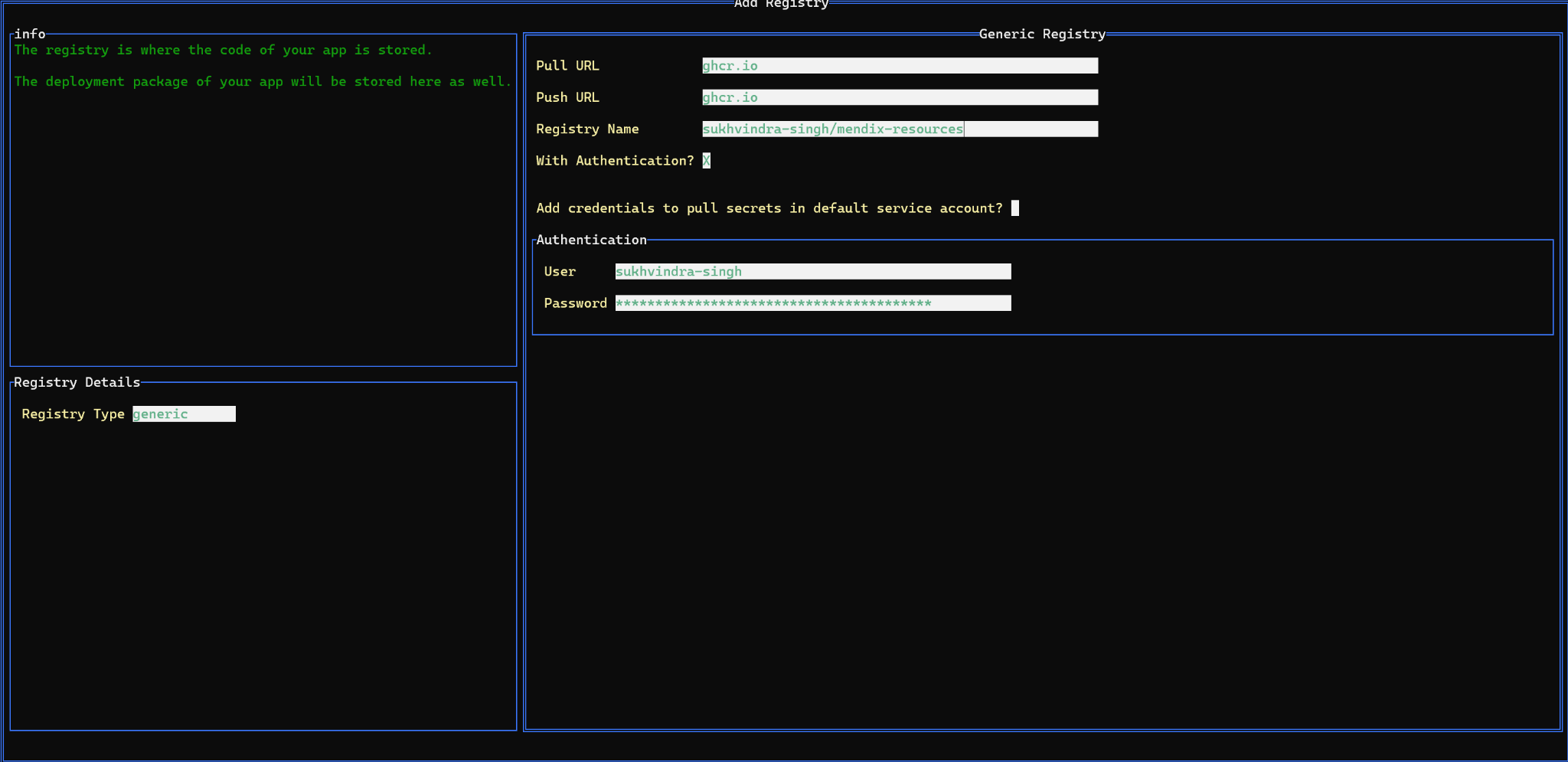
Corrected GHCR configuration. The token remains masked.
Evaluate and apply the configuration
Evaluate Configuration should report Valid configuration for Storage Plan, Database Plan, Ingress, and Registry. Then select Write YAML and Apply Configuration. Treat the generated YAML as sensitive because it can contain credentials.

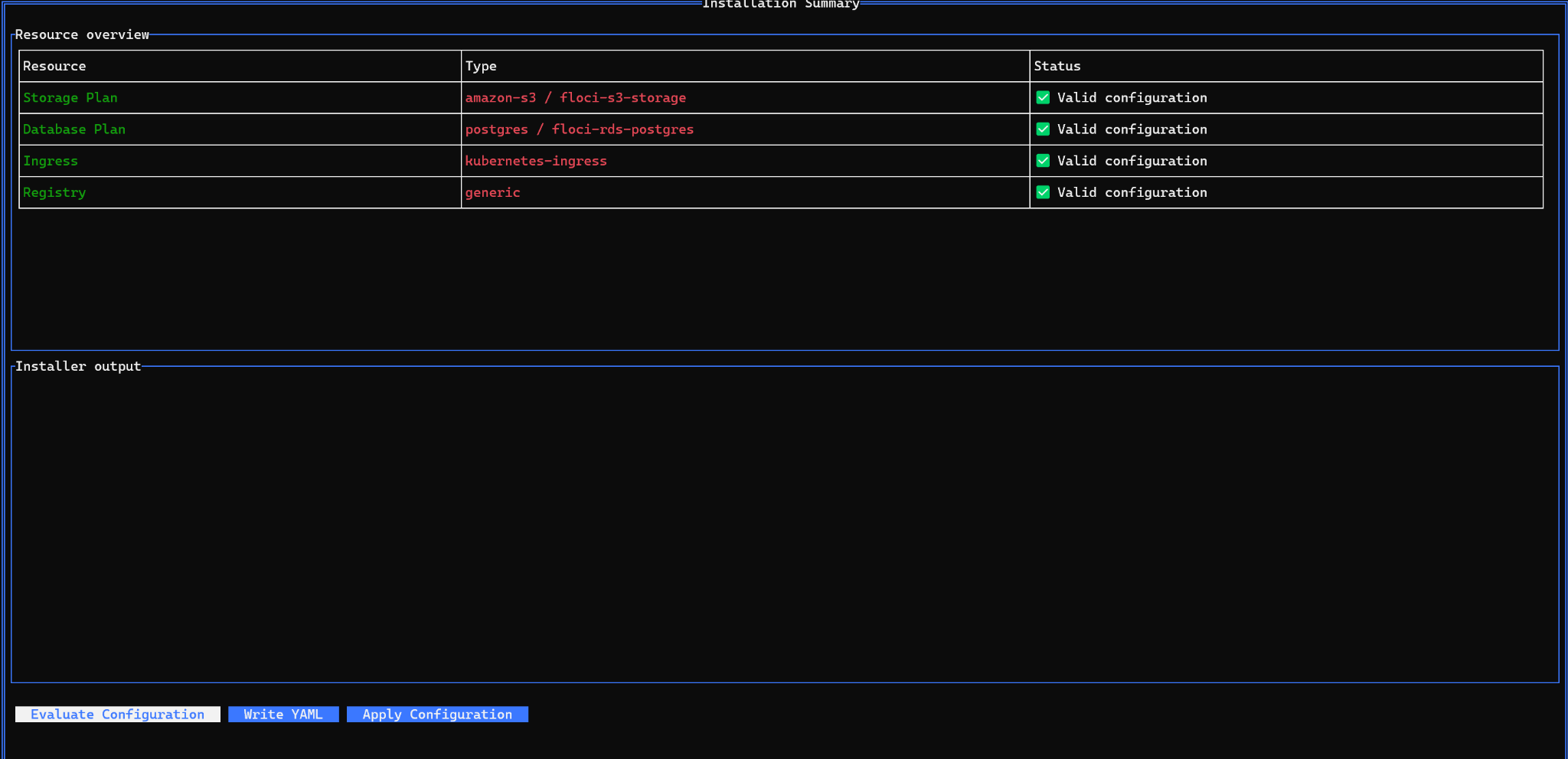
All four namespace resources pass configuration evaluation.

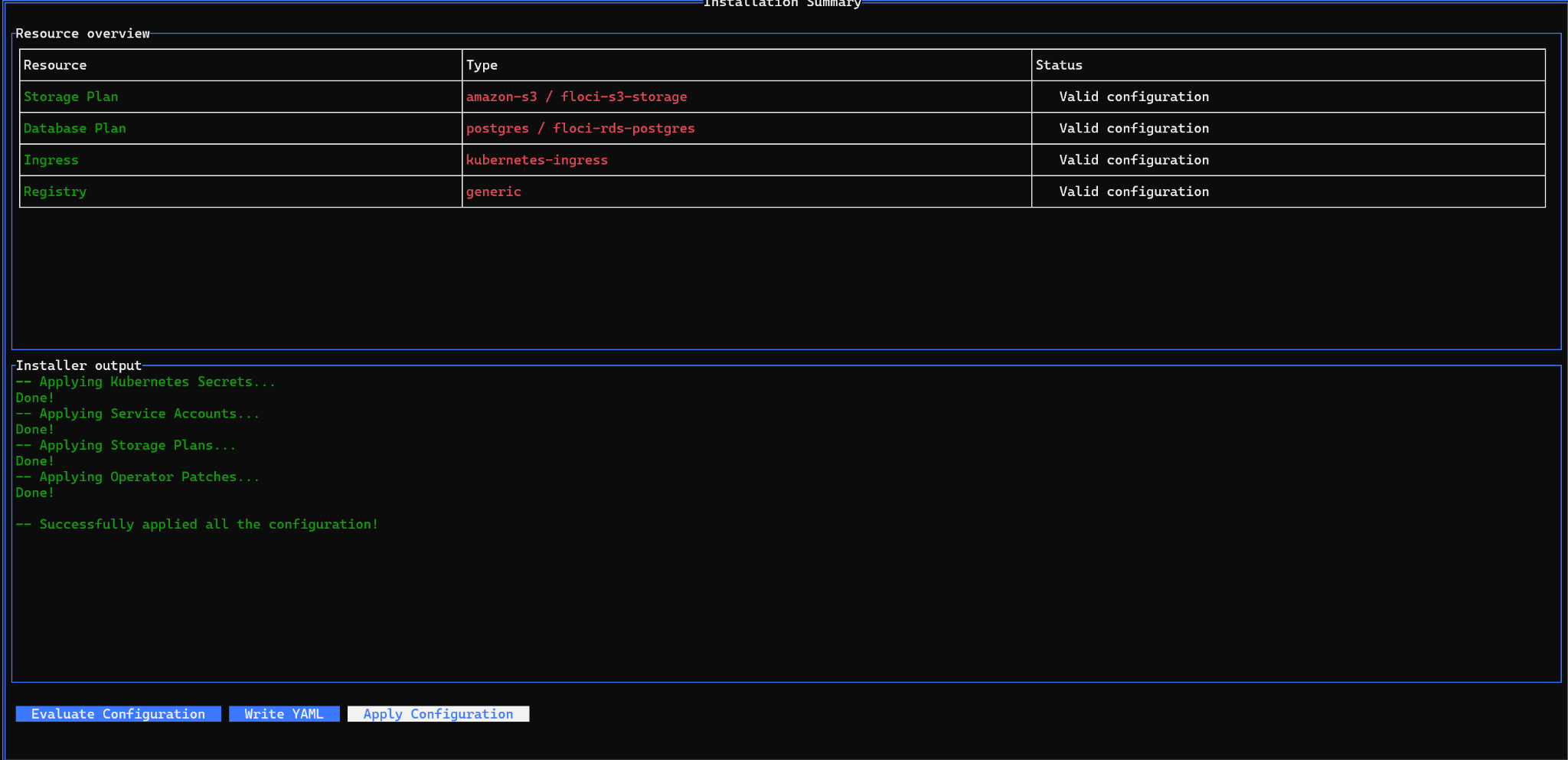
The installer successfully applies all namespace configuration.
Create a package and development environment
Build a deployment package
1. Open the app in Mendix Portal and go to Deployment, Environments, Deployment Packages.
2. Select Create Deployment Package.
3. Choose the main branch and the required revision.
4. Enter the semantic version and select Build this revision.
5. Wait for the package to show a green completed indicator.

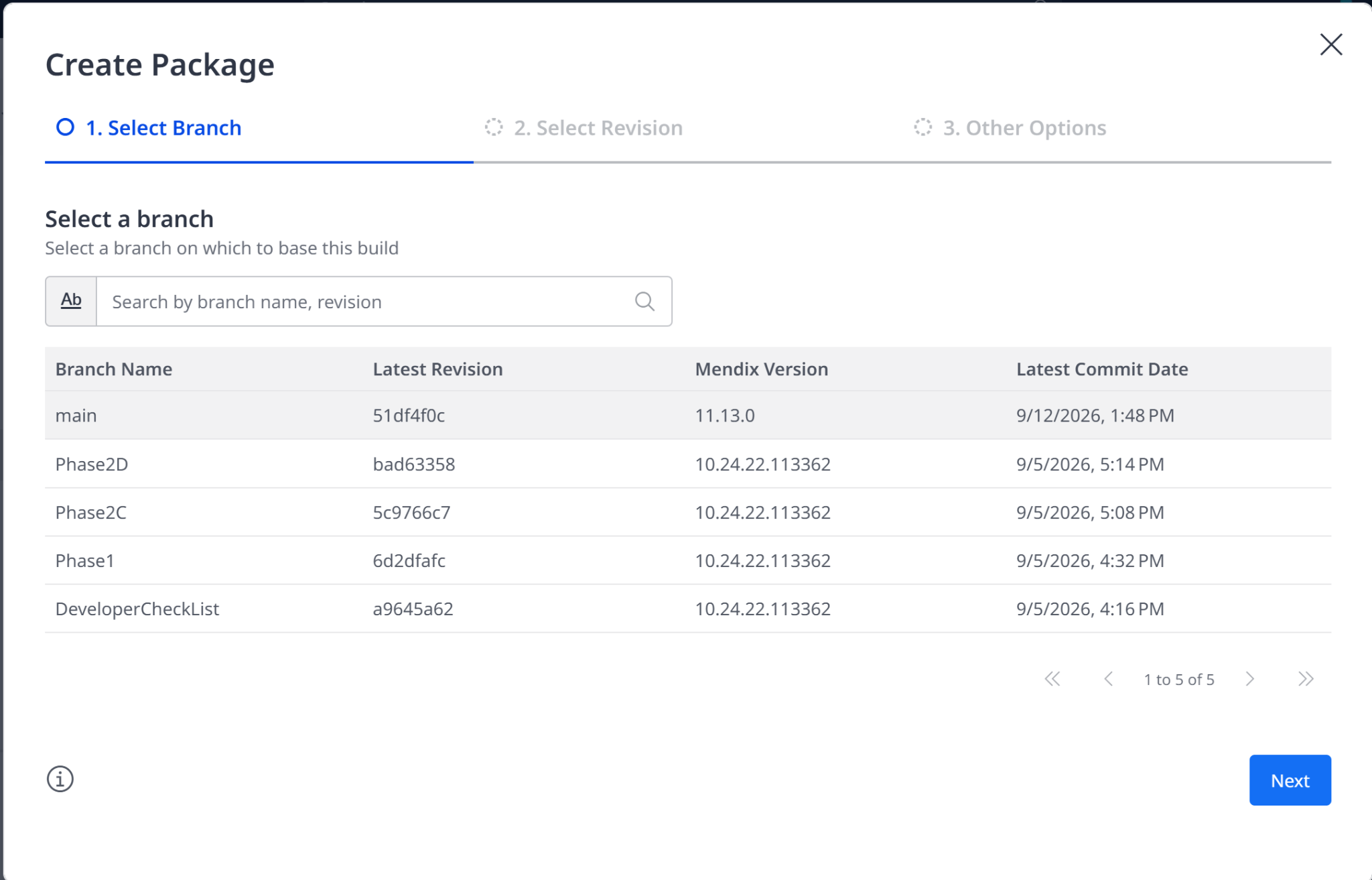
Select the main branch for the deployment package.

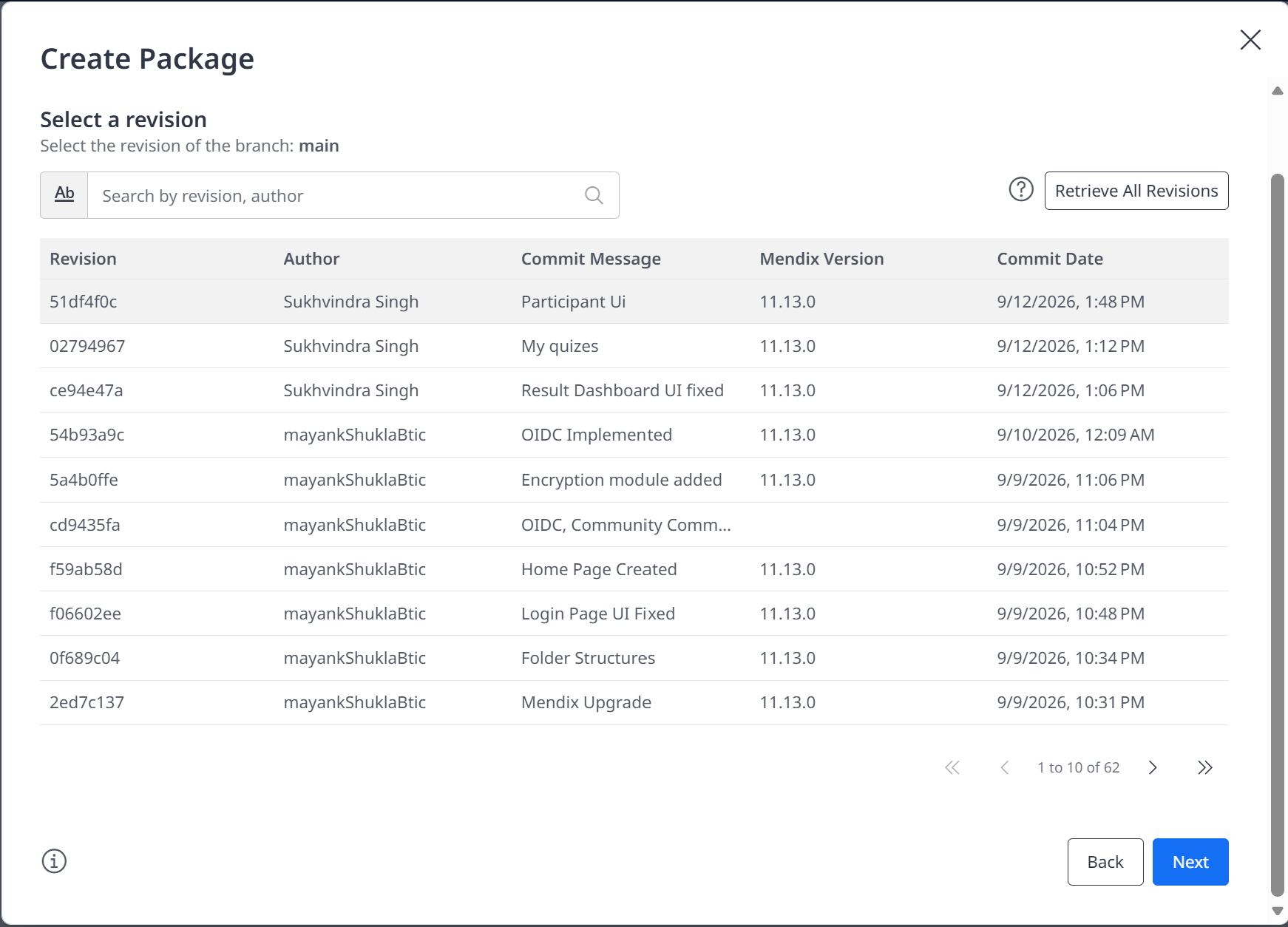
Select the required main-branch revision.

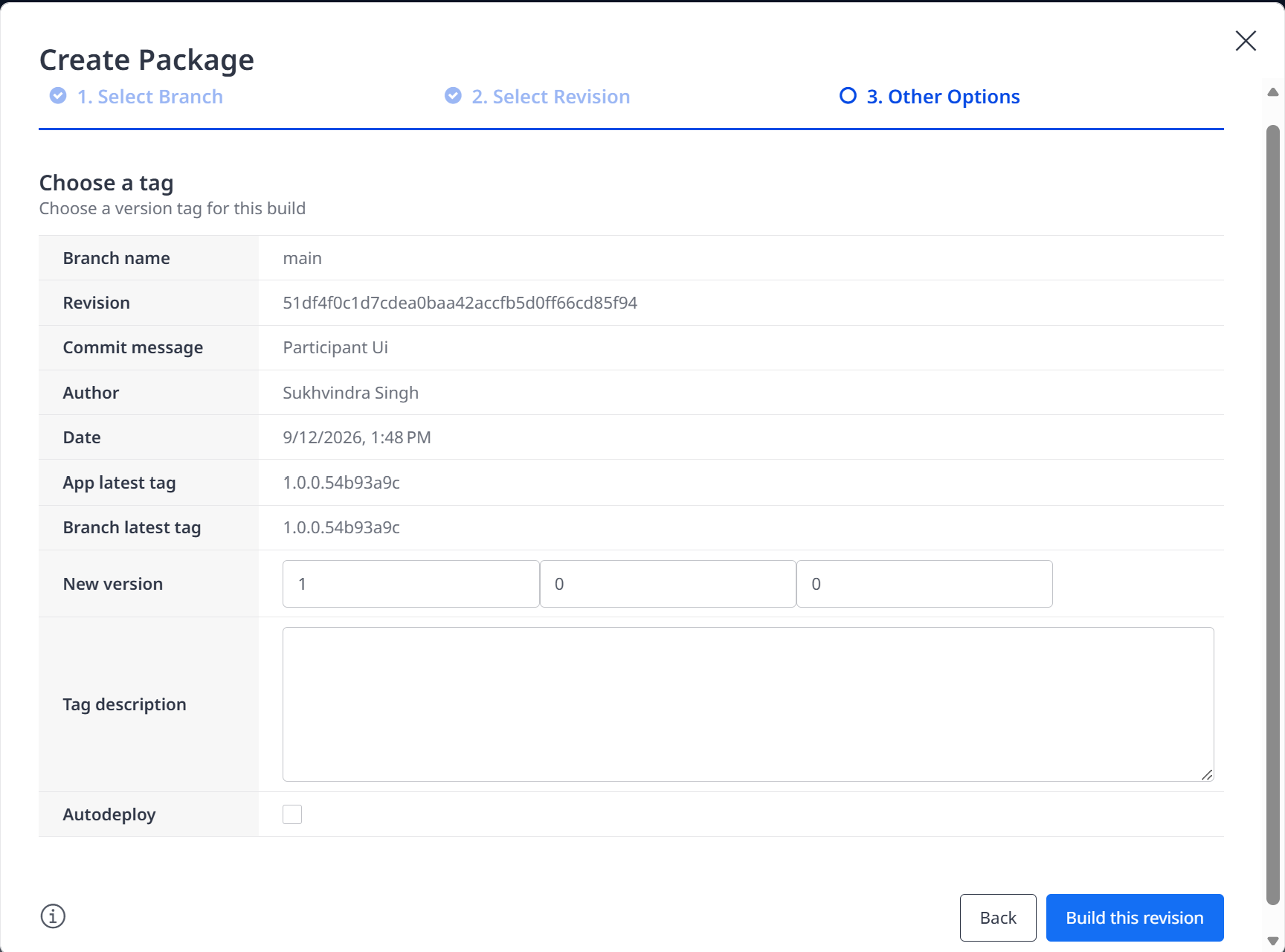
Review the version and build the selected revision.
Create the Development environment
1. Select Create Environment and choose the newly completed package.
2. Keep the generated lowercase environment ID. The verified ID was a0y77t7f.
3. Set Environment Name and Purpose to Development.
4. Select namespace mendix-floci on floci-mendix-cluster.
5. Use the genuine Mendix subscription secret only when a licensed runtime is available. Never use a GitHub token in this field.
6. Choose XS resources, floci-rds-postgres, and floci-s3-storage.
7. Create the environment and wait for Build and Runtime to become green.

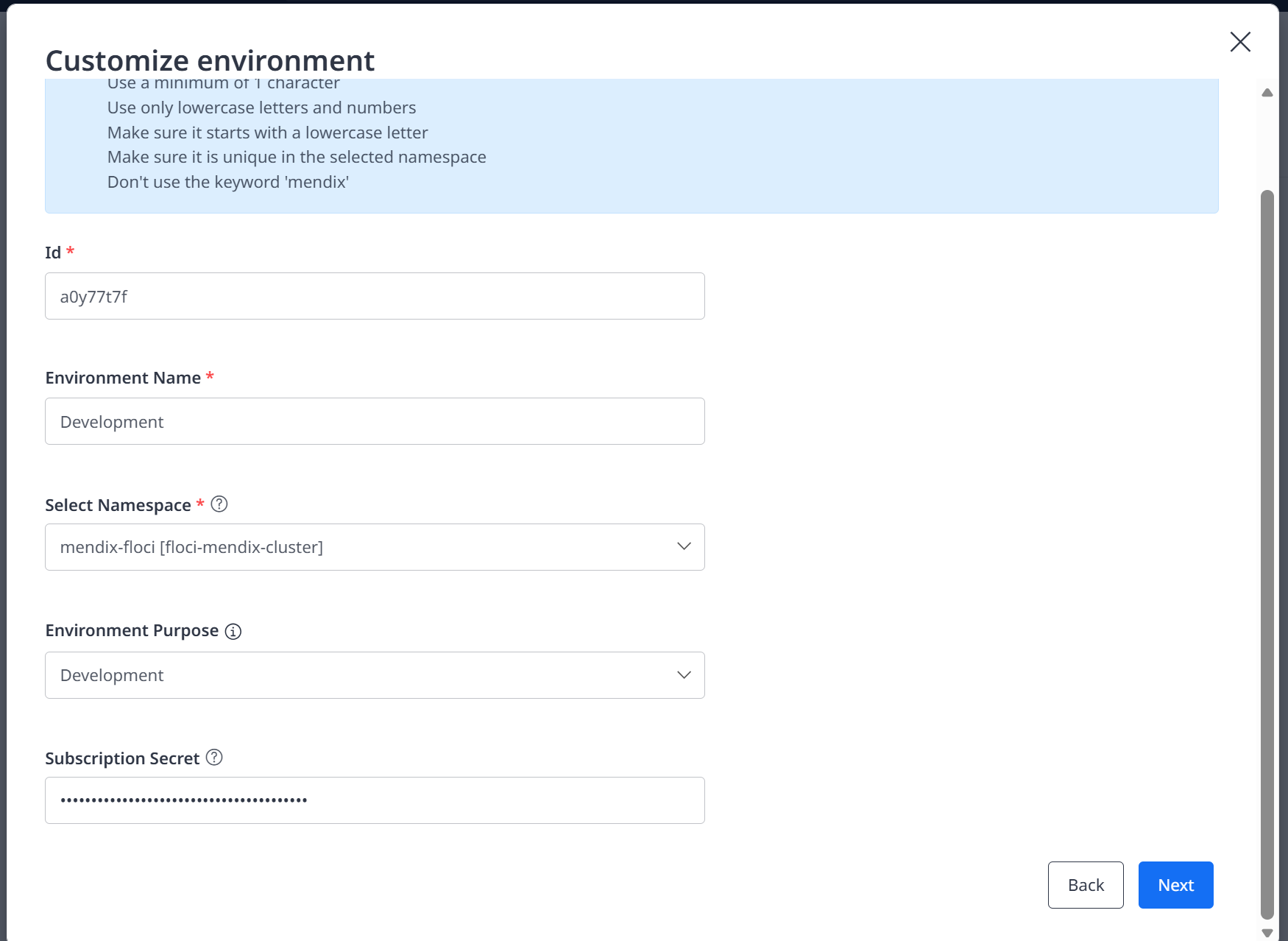
Development environment identity and namespace selection. The subscription secret is masked.

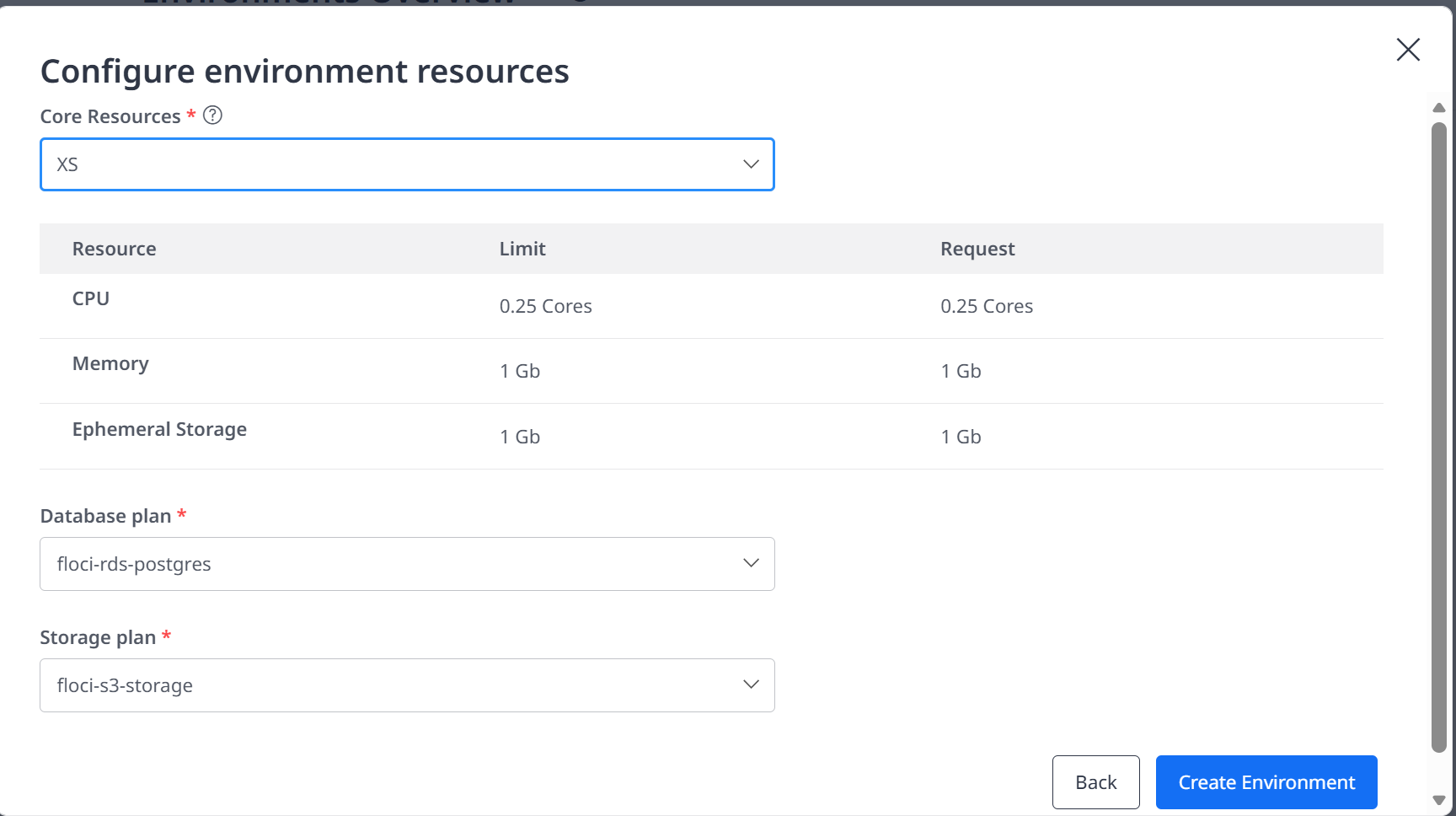
XS runtime resources with the verified database and storage plans.
Fix the free ngrok hostname
Mendix normally prefixes the namespace domain with the environment ID. A free ngrok reserved domain covers the exact hostname, not an arbitrary environment subdomain. Set spec.appURL to the hostname only. Do not include http://, https://, or a trailing slash; Kubernetes rejects a scheme as an invalid Ingress host.
Use the generated environment ID shown by MendixApp:
kubectl get mendixapp -n mendix-floci
Apply the hostname-only override:
kubectl patch mendixapp a0y77t7f `
-n mendix-floci `
--type=merge `
--patch '{\spec\:{\appURL\:\completable-noncommemorational-terica.ngrok-free.dev\}}'
The Operator should reconcile the Ingress and status. If it repeatedly restores the environment prefix, use the controlled sequence below.
kubectl scale deployment mendix-operator -n mendix-floci --replicas=0
kubectl patch ingress a0y77t7f -n mendix-floci --type=json `
--patch '[{\op\:\replace\,\path\:\/spec/rules/0/host\,\value\:\completable-noncommemorational-terica.ngrok-free.dev\}]'kubectl patch mendixapp a0y77t7f -n mendix-floci --subresource=status `
--type=merge `
--patch '{\status\:{\appURL\:\http://completable-noncommemorational-terica.ngrok-free.dev/\\}}'kubectl patch mendixapp a0y77t7f -n mendix-floci --type=merge `
--patch '{\spec\:{\appURL\:\completable-noncommemorational-terica.ngrok-free.dev\}}'kubectl scale deployment mendix-operator -n mendix-floci --replicas=1
Wait for the Operator to become ready, refresh Mendix Portal, and confirm the Network, Storage, Database, Service Account, Build, and Runtime indicators are green.
Invoke-WebRequest `
-Uri "https://completable-noncommemorational-terica.ngrok-free.dev/" `
-UseBasicParsing
Expected result: StatusCode 200 and StatusDescription OK.

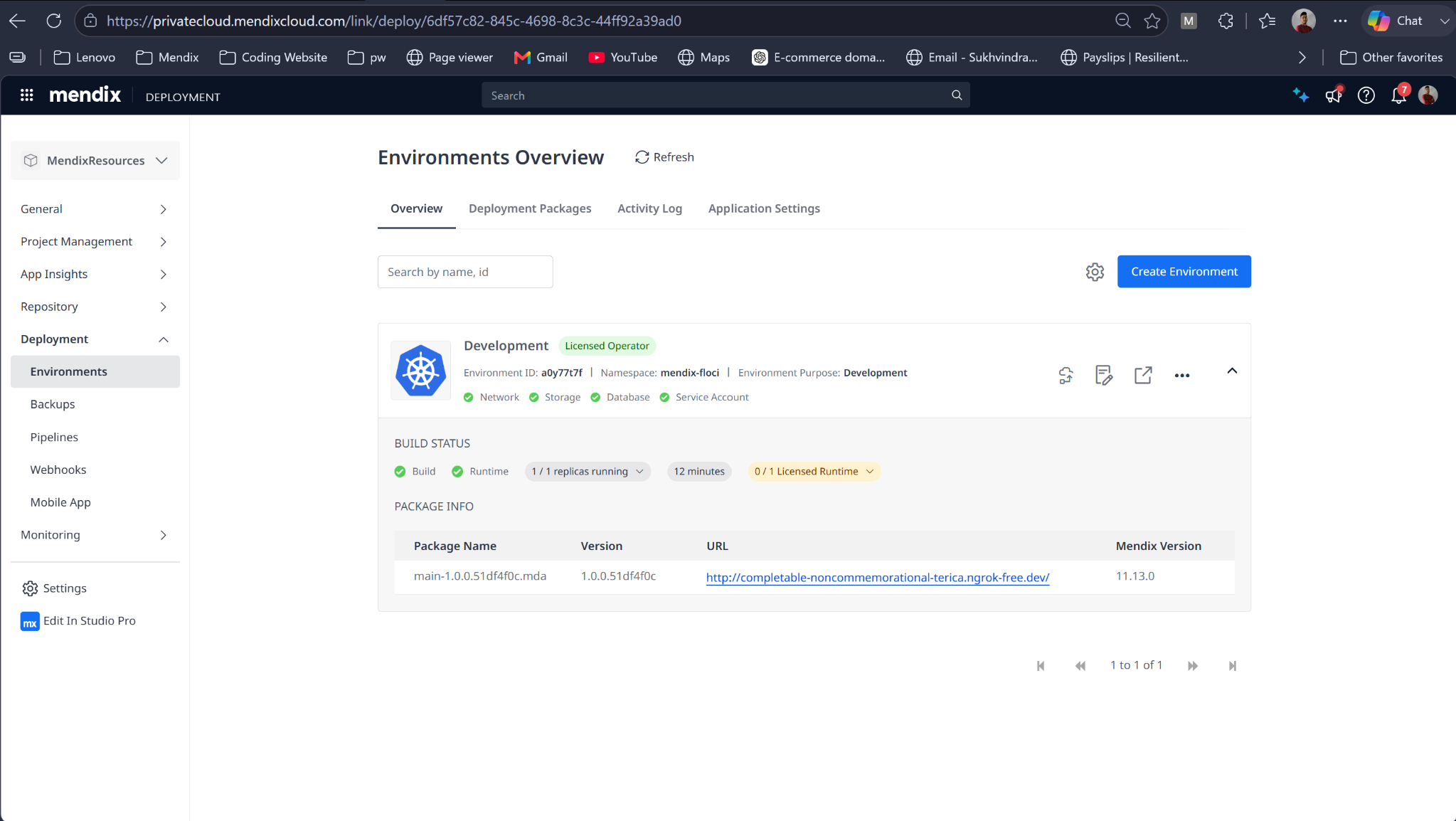
Verified final environment: infrastructure, build, and runtime checks are green and the fixed URL is displayed.
The optional Licensed Runtime counter can remain 0 of 1 when no commercial runtime subscription is activated. It does not invalidate this local demonstration when the runtime is healthy and the application returns HTTP 200.
Troubleshoot GHCR image pulls
Symptom
The runtime pod reports ErrImagePull or ImagePullBackOff. Pod events contain failed to authorize and 401 Unauthorized for ghcr.io. If imagePullSecrets is empty, Kubernetes attempted an anonymous pull from a private package.
Diagnosis
kubectl describe pod <RUNTIME_POD> -n mendix-floci
kubectl get pod <RUNTIME_POD> -n mendix-floci -o jsonpath="{.spec.imagePullSecrets}"
kubectl get secrets -n mendix-floci
kubectl get pod <RUNTIME_POD> -n mendix-floci -o jsonpath="{.spec.serviceAccountName}"
Expected secret: mendix-registry-generic-secret. The verified runtime used the default service account.
Attach the pull secret
This Windows-compatible command preserves the JSON quotes passed to kubectl:
kubectl patch serviceaccount default -n mendix-floci --type=merge `
--patch '{\imagePullSecrets\:[{\name\:\mendix-registry-generic-secret\}]}'
Delete only the failed runtime pod. Its Deployment recreates it with the pull secret.
kubectl delete pod <RUNTIME_POD> -n mendix-floci
Expected progression: ErrImagePull, ContainerCreating, then 2/2 Running. Temporary readiness HTTP 500 responses can occur while the Mendix runtime initializes.
Rotate the GHCR credential securely
$ghcrSecureToken = Read-Host "Enter the new GitHub token" -AsSecureString
$ghcrToken = [Runtime.InteropServices.Marshal]::PtrToStringAuto(
[Runtime.InteropServices.Marshal]::SecureStringToBSTR($ghcrSecureToken)
)kubectl create secret docker-registry mendix-registry-generic-secret `
-n mendix-floci `
--docker-server=ghcr.io `
--docker-username=sukhvindra-singh `
--docker-password="$ghcrToken" `
--dry-run=client -o yaml | kubectl apply -f -\(ghcrToken = \)null
\(ghcrSecureToken = \)null
Restore the lab automatically after restart
Docker containers and Kubernetes volumes persist, but ngrok and kubectl port-forward are host processes and do not reliably resume after Windows restarts. The verified startup script checks Docker Desktop, recreates the fixed network when absent, starts Floci/K3s/RDS, repairs fixed addresses, waits for Kubernetes and ingress, starts forwarding processes, and validates the public URL.
Create the script
Save the following as D:\Floci\scripts\Start-FlociLab.ps1. Adjust only ComposeFile or NgrokExe if the local paths differ.
$ErrorActionPreference = "Stop"
$ComposeFile = "D:\Developer-Knowledge-Hub\01-Inbox\Floci\compose.yml"
$NgrokExe = "C:\Users\sukhv\Downloads\ngrok-v3-stable-windows-amd64\ngrok.exe"
$DockerNetwork = "floci_default"
$K3sContainer = "floci-eks-mendix-floci-cluster"
$KubeContext = "floci-mendix"
$Namespace = "mendix-floci"
$PublicDomain = "completable-noncommemorational-terica.ngrok-free.dev"
\(PublicURL = "https://\)PublicDomain/"
$LogDirectory = "D:\Floci\scripts\logs"
New-Item -ItemType Directory -Force -Path $LogDirectory | Out-Nullfunction Test-Docker {
docker info *> $null
return ($LASTEXITCODE -eq 0)
}function Start-ContainerIfStopped([string]$Name) {
\(exists = docker ps -a --filter "name=^/\){Name}$" --format "{{.Names}}"
if (\(exists -eq \)Name) {
\(running = docker ps --filter "name=^/\){Name}$" --format "{{.Names}}"
if (\(running -ne \)Name) { docker start $Name | Out-Null }
}
}function Set-FixedNetworkIP([string]$Name, [string]$RequiredIP) {
\(exists = docker ps -a --filter "name=^/\){Name}$" --format "{{.Names}}"
if (\(exists -ne \)Name) { Write-Warning "Container not found: $Name"; return }
\(inspect = docker inspect \)Name | ConvertFrom-Json
\(property = \)inspect[0].NetworkSettings.Networks.PSObject.Properties[$DockerNetwork]
\(currentIP = if (\)null -ne \(property) { \)property.Value.IPAddress } else { $null }
if (\(currentIP -eq \)RequiredIP) { return }
\(wasRunning = (docker inspect \)Name --format "{{.State.Running}}") -eq "true"
if (\(wasRunning) { docker stop \)Name | Out-Null }
# Disconnect only when the container is already attached to the network.
# This prevents Task Scheduler result 1 after a Windows restart.
if (\(null -ne \)property) {
docker network disconnect -f $DockerNetwork $Name | Out-Null
if ($LASTEXITCODE -ne 0) {
throw "Failed to disconnect $Name from $DockerNetwork."
}
}
docker network connect --ip $RequiredIP $DockerNetwork $Name
if ($LASTEXITCODE -ne 0) {
throw "Failed to connect $Name to $DockerNetwork using $RequiredIP."
}
if (\(wasRunning) { docker start \)Name | Out-Null }
}if (-not (Test-Docker)) {
Start-Process "C:\Program Files\Docker\Docker\Docker Desktop.exe"
\(ready = \)false
foreach ($attempt in 1..60) {
Start-Sleep -Seconds 2
if (Test-Docker) { \(ready = \)true; break }
}
if (-not $ready) { throw "Docker Desktop did not become ready." }
}docker network inspect \(DockerNetwork *> \)null
if ($LASTEXITCODE -ne 0) {
docker network create --driver bridge --subnet 172.20.0.0/16 `
--gateway 172.20.0.1 $DockerNetwork | Out-Null
}\(previousErrorActionPreference = \)ErrorActionPreference
$ErrorActionPreference = "Continue"
\(composeOutput = docker compose -f \)ComposeFile up -d 2>&1
\(composeExitCode = \)LASTEXITCODE
\(ErrorActionPreference = \)previousErrorActionPreference
\(composeOutput | ForEach-Object { Write-Host \)_ }
if ($composeExitCode -ne 0) {
throw "Docker Compose failed with exit code $composeExitCode."
}
Set-FixedNetworkIP "floci-floci-1" "172.20.0.6"foreach ($attempt in 1..60) {
$health = docker inspect floci-floci-1 `
--format "{{if .State.Health}}{{.State.Health.Status}}{{else}}{{.State.Status}}{{end}}" 2>$null
if ($health -eq "healthy") { break }
Start-Sleep -Seconds 2
}Start-ContainerIfStopped $K3sContainer
Set-FixedNetworkIP $K3sContainer "172.20.0.4"$RdsContainer = docker ps -a --format "{{.Names}}" |
Where-Object { $_ -like "floci-rds-*" } | Select-Object -First 1
if ($RdsContainer) {
Start-ContainerIfStopped $RdsContainer
Set-FixedNetworkIP $RdsContainer "172.20.0.3"
}kubectl config use-context $KubeContext | Out-Null
\(nodeReady = \)false
\(previousErrorActionPreference = \)ErrorActionPreference
$ErrorActionPreference = "Continue"
try {
foreach ($attempt in 1..150) {
kubectl get nodes *> $null
if ($LASTEXITCODE -eq 0) {
kubectl wait --for=condition=Ready node --all --timeout=10s *> $null
if (\(LASTEXITCODE -eq 0) { \)nodeReady = $true; break }
}
Start-Sleep -Seconds 2
}
}
finally {
\(ErrorActionPreference = \)previousErrorActionPreference
}
if (-not $nodeReady) {
throw "The Kubernetes node did not become ready within five minutes."
}kubectl rollout status deployment/ingress-nginx-controller `
-n ingress-nginx --timeout=180s$portForward = Get-CimInstance Win32_Process | Where-Object {
\(_.Name -match "kubectl" -and \)_.CommandLine -match "port-forward" -and
$_.CommandLine -match "8080:80"
}
if (-not $portForward) {
Start-Process (Get-Command kubectl).Source `
-ArgumentList @("port-forward","--address","127.0.0.1",
"-n","ingress-nginx",
"service/ingress-nginx-controller","8080:80") `
-RedirectStandardOutput "$LogDirectory\ingress-port-forward.log" `
-RedirectStandardError "$LogDirectory\ingress-port-forward.error.log" `
-WindowStyle Hidden
Start-Sleep -Seconds 5
}$ngrok = Get-CimInstance Win32_Process | Where-Object {
\(_.Name -eq "ngrok.exe" -and \)_.CommandLine -match "127.0.0.1:8080" -and
$_.CommandLine -match "default.internal"
}
if (-not $ngrok) {
Get-Process ngrok -ErrorAction SilentlyContinue | Stop-Process -Force
Start-Process $NgrokExe `
-ArgumentList @("http","http://127.0.0.1:8080",
"--url","https://default.internal",
"--log","$LogDirectory\ngrok.log","--log-format","json") `
-RedirectStandardOutput "$LogDirectory\ngrok-output.log" `
-RedirectStandardError "$LogDirectory\ngrok-error.log" `
-WindowStyle Hidden
Start-Sleep -Seconds 8
}\(runtimeReady = \)false
foreach ($attempt in 1..60) {
\(pods = kubectl get pods -n \)Namespace -o json | ConvertFrom-Json
\(runtimePods = @(\)pods.items | Where-Object {
\(_.metadata.name -match "-master-" -and \)_.status.phase -eq "Running"
})
foreach ($pod in $runtimePods) {
\(statuses = @(\)pod.status.containerStatuses)
if ($statuses.Count -gt 0 -and
@(\(statuses | Where-Object { -not \)_.ready }).Count -eq 0) {
\(runtimeReady = \)true
Write-Host "Mendix runtime is ready: $($pod.metadata.name)"
break
}
}
if ($runtimeReady) { break }
Start-Sleep -Seconds 10
}\(available = \)false
if ($runtimeReady) {
foreach ($attempt in 1..12) {
try {
\(response = Invoke-WebRequest -Uri \)PublicURL -UseBasicParsing -TimeoutSec 20
if (\(response.StatusCode -eq 200) { \)available = $true; break }
} catch { }
Start-Sleep -Seconds 10
}
}if (-not $available) { throw "Public Mendix URL did not return HTTP 200." }
Write-Host "Floci Mendix lab is ready: $PublicURL" -ForegroundColor Green
kubectl get pods -n $Namespace
Validate the final script
The final restart-safe version contains three important corrections. Set-FixedNetworkIP disconnects only when a container is already attached. Docker Compose and the Kubernetes readiness loop temporarily tolerate expected native stderr while retaining explicit exit-code checks. The port-forward binds to 127.0.0.1 and ngrok targets http://127.0.0.1:8080, avoiding the IPv6 localhost failure at ::1. The script waits up to 10 minutes for the runtime before validating the public URL.
\(syntaxErrors = \)null
[System.Management.Automation.Language.Parser]::ParseFile(
"D:\Floci\scripts\Start-FlociLab.ps1",
[ref]$null,
[ref]$syntaxErrors
) | Out-Null
$syntaxErrors
No output means the PowerShell syntax is valid. Run the script once before registering it.
powershell.exe -NoProfile -ExecutionPolicy Bypass `
-File "D:\Floci\scripts\Start-FlociLab.ps1"
Create the hidden VBS launcher
Save this file as D:\Floci\scripts\Start-FlociLab.vbs. WScript launches the PowerShell recovery script with window style 0, waits for its exit code, and records all startup output without leaving a visible terminal open.
Set shell = CreateObject("WScript.Shell")
command = "powershell.exe -NoProfile -NonInteractive -ExecutionPolicy Bypass -Command ""& 'D:\Floci\scripts\Start-FlociLab.ps1' *> 'D:\Floci\scripts\logs\scheduled-task.log'"""
exitCode = shell.Run(command, 0, True)
WScript.Quit exitCode
Run automatically at Windows sign in
$taskAction = New-ScheduledTaskAction `
-Execute "wscript.exe" `
-Argument '"D:\Floci\scripts\Start-FlociLab.vbs"'$taskTrigger = New-ScheduledTaskTrigger `
-AtLogOn `
-User $env:USERNAME
$taskTrigger.Delay = "PT2M"$taskSettings = New-ScheduledTaskSettingsSet `
-StartWhenAvailable `
-ExecutionTimeLimit ([TimeSpan]::Zero) `
-MultipleInstances IgnoreNew `
-Hidden$taskPrincipal = New-ScheduledTaskPrincipal `
-UserId "$env:USERDOMAIN\env:USERNAME" `
-LogonType Interactive `
-RunLevel HighestRegister-ScheduledTask `
-TaskName "Start Floci Mendix Lab" `
-Action $taskAction `
-Trigger $taskTrigger `
-Settings $taskSettings `
-Principal $taskPrincipal `
-Description "Restores the Floci Mendix lab two minutes after Windows sign-in" `
-Force# Disable the obsolete task that opened a visible PowerShell window.
Disable-ScheduledTask -TaskName "Mendix Local Startup"Start-ScheduledTask -TaskName "Start Floci Mendix Lab"
Start-Sleep -Seconds 30
Get-ScheduledTaskInfo -TaskName "Start Floci Mendix Lab" |
Select-Object LastRunTime, LastTaskResult, NextRunTime
Verified final result on 13 September 2026: LastTaskResult was 0 after an actual Windows restart. Docker starts at sign-in, the recovery task begins after a two-minute delay, the VBS launcher keeps PowerShell hidden, and the IPv4 port-forward and ngrok tunnel run without visible windows. The Mendix runtime reached 2/2 Running, Agent and Operator reached 1/1 Running, and the public URL returned HTTP 200.
Final validation and operating notes
| Check | Expected result |
|---|---|
| docker inspect floci-floci-1 | Healthy; floci_default=172.20.0.6 |
| docker inspect floci-rds-* | floci_default=172.20.0.3 |
| docker inspect K3s container | floci_default=172.20.0.4 |
| kubectl get nodes | One Ready control-plane node |
| kubectl get pods -n mendix-floci | Agent 1/1, Operator 1/1, runtime 2/2 |
| kubectl get pods -n ingress-nginx | Controller 1/1 Running |
| Mendix Portal | Network, Storage, Database, Service Account, Build, Runtime green |
| Invoke-WebRequest public URL | HTTP 200 OK |
| Scheduled task | LastTaskResult 0 |
Normal startup behavior
The Kubernetes API and containers can take several minutes to become ready after Docker Desktop starts.
A runtime pod can temporarily report readiness HTTP 500 while Mendix initializes.
The public URL is unavailable until both kubectl port-forward and the ngrok agent are running.
Use 127.0.0.1 explicitly for both port-forward and ngrok; localhost can resolve to IPv6 ::1 and cause a refused private-leg connection.
The exact free ngrok hostname supports one environment at a time. Multiple environment subdomains require a wildcard-capable domain or separate endpoints.
The startup script writes host-process logs under D:\Floci\scripts\logs. Task Scheduler may remain Running while the script waits; LastTaskResult becomes 0 after completion.
Keep Mendix Local Startup disabled. It is the obsolete duplicate task that opened a visible Administrator PowerShell window.
Safe recovery order
1. Run D:\Floci\scripts\Start-FlociLab.ps1.
2. Confirm the three fixed Docker addresses.
3. Confirm the floci-mendix context and Ready node.
4. Confirm ingress-nginx, Agent, Operator, and runtime pods.
5. Inspect only the failing component logs; never publish full secrets or unredacted custom resource YAML.
6. Validate the public URL with Invoke-WebRequest.